[Day 29] Checklist: 打個勾勾完賽吧
很快地,今天來到了第29天,我們來實作Day #27
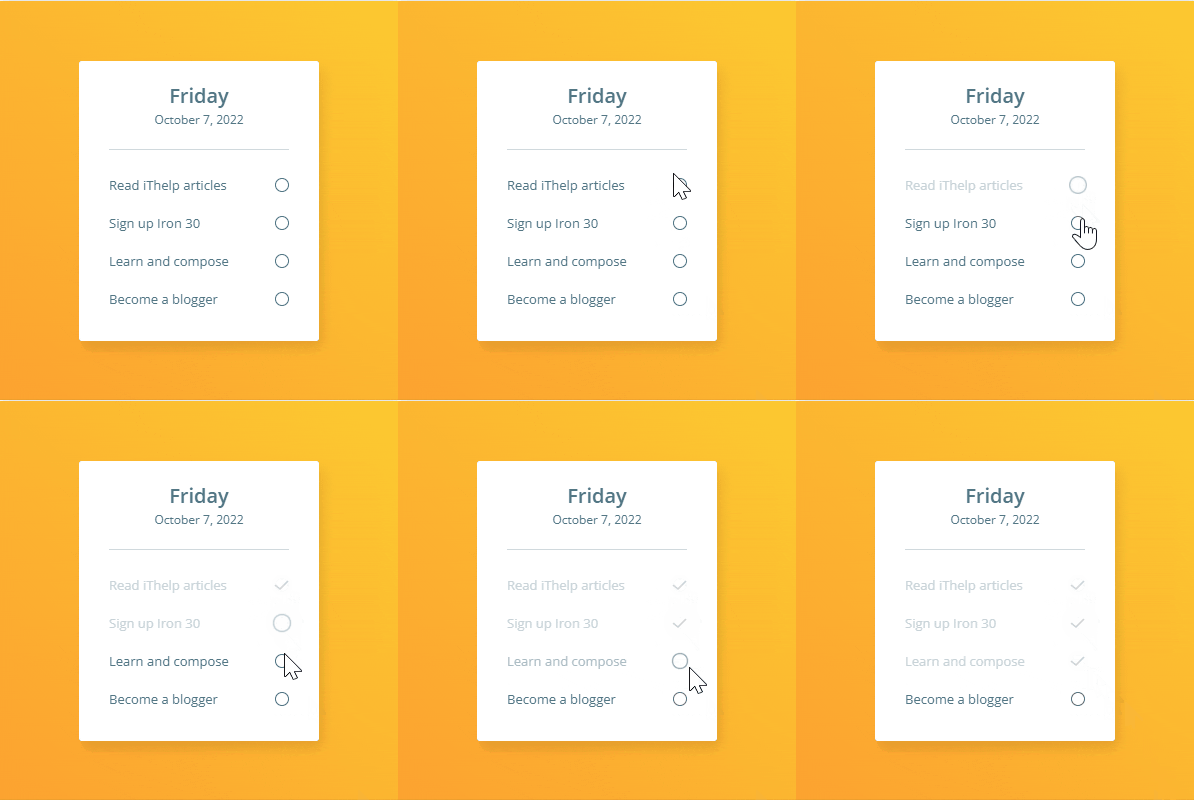
CodePen: https://codepen.io/stevetanus/pen/KKRRbBp
1. HTML
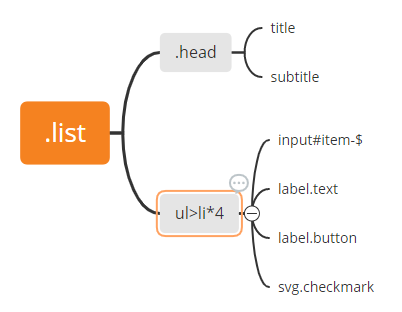
在.list中有表頭(.head)跟一個ul tag(unordered list),裡面有四個li tag,我們使用ul>list*4的快捷emmet語法。
每個li裡面有input、兩個label、svg。input#item-$的快捷語法代表id="item-順序數字"的input tag,所以這邊有四個input,他們的id依序為item-1到item-4,而他們也有對應的label,分別是.text跟.button,SVG則為打勾的圖案。
2. SCSS(CSS)
.list
.list {
    position: absolute;
    width: 240px;
    height: 280px;
    top: 60px;
    left: 80px;
    background: #ffffff;
    box-shadow: 4px 8px 12px 0px rgba(0, 0, 0, 0.1); // 使list看起來更立體
    border-radius: 3px; // 邊角圓潤點

    .head {
      padding: 20px 0; // 上下20px 左右0px
      margin: 0 30px; // 上下0px 左右30px
      border-bottom: 1px solid #d4dce0; // 下面的分隔線
    }

    .title {
      font-weight: 600;
      font-size: 20px;
      line-height: 30px; //高過於font-size,讓主標題與副標題中間有距離
      text-align: center;
    }

    .subtitle {
      font-size: 12px;
      line-height: 18px;
      text-align: center;
    }
    ...
ul
ul {
      list-style: none; // 把小黑點移除
      padding: 4px 0;
      margin: 0 30px; // 左右30px,和.head相同
      ...
li
  li {
    position: relative; // 相對位置
    display: block;
    margin: 24px 0;
    height: 14px;
    display: flex; // 水平排列
    align-items: center; // 上下置中
    justify-content: space-between; // 使flex-box內元素間距平分在中間,在這邊時,只會有兩個元素的情況,他們在最左和最右側,中間為間距。
  }
label & svg.checkmark
      .text {
        font-size: 13px;
        line-height: 14px;
        cursor: pointer;
        transition: all 0.3s ease-in-out;
      }
      .button {
        z-index: 2; // z-index高過於svg才可以點擊
        width: 14px;
        height: 14px;
        box-sizing: border-box;
        border: 1px solid #497081;
        border-radius: 50%; // 為圓形外框,像是按鈕
        transition: all 0.4s ease-out 0.5s; // input取消點擊狀態時過0.5s開始動畫
        cursor: pointer;
      }
      .checkmark {
        position: absolute; // 絕對位置,父層為li元素
        top: 2px;
        right: 0;
        fill: none;
        stroke: #c8d4d9;
        stroke-width: 1.5;
        stroke-dasharray: 30 30; // 30單位實線與間隔
        stroke-dashoffset: 30; // 推移30單位,一開始為看不見的
        transition: all 0.5s ease-out; // input取消點擊狀態時,立刻開始動畫
      }
input(input:checked)
      input {
        display: none; // 再會惹

        &:checked ~ .text {
          color: #c8d4d9; // 文字變為淺灰色
        }

        &:checked ~ .button {
          transition: all 0.4s ease-in; // 點擊時圓框放大消失
          scale: 1.5;
          opacity: 0;
        }

        &:checked ~ .checkmark {
          stroke-dashoffset: 0; // 推移0單位
          transition: all 0.5s ease-out 0.4s; // 點擊時過0.4s開始動畫,勾勾出現
        }
      }
    }
打包帶走(take away)
HTML
| 目標 | 屬性 |
|---|---|
| 列表產生 | ul>li*n |
| input的標籤可以有很多個 | label for="id"可以有很多個 |
| CSS |
| 目標 | 屬性 |
|---|---|
| 主軸元素中間距離均分 | justfy-content: space-between(jcsb) |
| 列表的小黑點清除 | list-style: none |
| input動畫控制 | transition的秒數設置,消失的元素(label)為先,出現的元素(label)為後 |
後記
哦今天是第29天,我接下來寫得很像結尾,但還沒有結束喔~
今天的勾選單(checklist)列出了我最近做的事情與未來的展望,從一開始因為工作的關係,在鐵人賽搜尋些Canvas、React之類的技術文章,幫助我解決了工作上的問題,感謝平台。剛好,在8月底的時候看到了鐵人賽的廣告,一開始就有點心動,但不禁想著我要寫什麼主題,JavaScript?Python?還是大雜燴?對我都有些難度耶,我好像沒有那麼多料可以寫(?,畢竟也才剛就職不久,後來想到我在4月很努力準備作品的時候,有過一段時間每天寫CSS100的挑戰,大概持續了6、7天就中斷了,上網搜尋之前的鐵人賽沒有搜尋到有人寫過這個挑戰...就形成了這次挑戰的契機,讓自己學習CSS、組織文章、使讀者們都有所收穫。 至於未來的話,希望自己能保持持續精進自己的動力,去找個平台寫文章,一步步地成為部落客吧!